

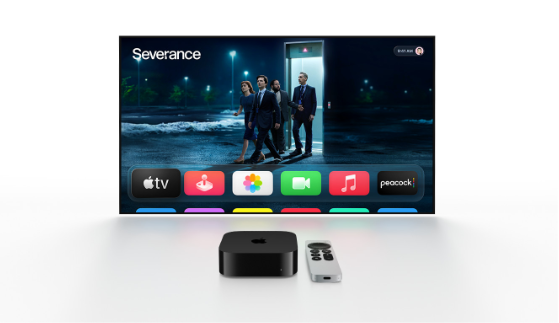
Apple TV is a digital media player and streaming device developed by Apple Inc. Since its initial release in 2007, Apple TV has evolved into a powerful entertainment hub, providing users access to streaming services, movies, TV shows, and gaming options. Apple TV allows users to stream content from popular platforms such as Netflix, Disney+, Hulu, and, of course, Apple’s own streaming service, Apple TV+. Its seamless integration with the Apple ecosystem ensures smooth connectivity with iPhones, iPads, and Macs, making it a versatile option for home entertainment.
The device connects to a television through an HDMI cable and can be controlled using the Apple TV Remote, a smartphone via the Apple TV app, or even through voice commands using Siri. Over the years, Apple has released several models, including Apple TV HD and Apple TV 4K, each offering different levels of performance and features
Key Features of Apple TV
Apple TV offers a wide range of features that make it a standout device in the streaming market. Some of the notable features include:
High-Definition and 4K Streaming
Apple TV supports high-definition content, and the 4K model allows users to enjoy Ultra HD visuals with HDR10, Dolby Vision, and Dolby Atmos for immersive audio and visual experiences. This ensures that movies and shows are displayed with excellent clarity, contrast, and sound quality.
Apple TV+ and Original Content
Apple TV+ is Apple’s subscription-based streaming service that offers original TV shows, movies, and documentaries. Popular shows like “Ted Lasso,” “The Morning Show,” and “Severance” have gained global recognition. Apple TV+ emphasizes high-quality production and exclusive content for subscribers.
Seamless Integration with Apple Ecosystem
Apple TV is designed to work smoothly with other Apple devices. Users can AirPlay content from their iPhone, iPad, or Mac directly to the TV. It also supports iCloud, allowing access to purchased movies, TV shows, and personal content across devices.
Gaming with Apple Arcade
Apple TV supports Apple Arcade, a subscription-based gaming service that offers a library of games without in-app purchases or ads. With the latest models, users can connect compatible controllers and enjoy console-quality games directly on their TV.
Siri and Voice Control
Apple TV comes with Siri integration, enabling users to search for content, control playback, and even manage smart home devices using voice commands. This feature simplifies navigation and makes the user experience more intuitive.
App Store Access
The Apple TV App Store provides access to thousands of apps, ranging from streaming platforms to fitness, education, and gaming apps. This expands the utility of Apple TV beyond simple media streaming.
Apple TV Models and Specifications
Apple TV has undergone several upgrades since its introduction, with the current major models being Apple TV HD and Apple TV 4K.
Apple TV HD
Released in 2015, Apple TV HD features 1080p video quality and is suitable for standard high-definition televisions. It includes the Apple TV Remote, a user-friendly interface, and access to the App Store and Apple TV+.
Apple TV 4K
Apple TV 4K, first introduced in 2017 and updated in 2021, supports 4K resolution, HDR10, Dolby Vision, and Dolby Atmos. It features the A12 Bionic chip, which enhances performance, streaming, and gaming capabilities. The 4K model is ideal for users with high-end televisions seeking a premium viewing experience.
Storage Options
Apple TV offers different storage capacities, typically 32GB and 64GB, allowing users to store apps, games, and downloaded content. The storage capacity mainly affects gaming and app usage rather than streaming, which relies on cloud services.
How to Set Up Apple TV
Setting up Apple TV is straightforward, designed to be user-friendly even for those who are not tech-savvy. The process involves:
- Connecting the Device: Plug the Apple TV into your television using an HDMI cable and connect it to a power source.
- Internet Connection: Connect Apple TV to Wi-Fi or Ethernet for streaming content.
- Sign In with Apple ID: Log in with your Apple ID to access purchased content, Apple TV+, and the App Store.
- Siri and Settings Configuration: Customize preferences such as Siri, screensaver, and audio settings.
- Downloading Apps: Access the App Store to install streaming apps, games, and other applications.
Once set up, users can begin streaming content immediately, using either the Apple TV Remote, the iPhone Remote app, or voice commands through Siri.
Apple TV Remote
The Apple TV Remote is a sleek, minimalistic device that allows users to navigate and control the Apple TV interface. Key features include:
- Touch Surface: A touch-sensitive area for swiping, scrolling, and selecting content.
- Siri Button: Press to activate Siri and use voice commands.
- Playback Controls: Play, pause, fast forward, and rewind content easily.
- Volume Control: Adjust TV volume without needing the original TV remote.
- Rechargeable Battery: The remote charges via a Lightning cable and can last weeks on a single charge.
Apple also offers alternative control methods, including using an iPhone or iPad as a remote through the Apple TV Remote app.
Apple TV and Home Integration
Apple TV is not just a streaming device; it also serves as a hub for Apple HomeKit. This allows users to control smart home devices, such as lights, thermostats, cameras, and locks, directly from their Apple TV. With the Home app integration, Apple TV can act as a central point for automating tasks and ensuring home security.
Apps and Entertainment Options
Apple TV provides access to a vast array of apps and entertainment options. Popular streaming apps like Netflix, Hulu, Disney+, Prime Video, and HBO Max are available. In addition, Apple TV offers music streaming through Apple Music and podcast apps, enabling users to enjoy a complete entertainment experience.
The device also supports sports streaming, news apps, and fitness apps like Apple Fitness+, allowing users to work out at home while following guided sessions on their TV.
Gaming on Apple TV
Apple TV has transformed into a capable gaming platform with Apple Arcade. Users can play casual and console-quality games using compatible controllers. Some popular games include “Oceanhorn,” “Sonic Racing,” and “LEGO Builder’s Journey.” With frequent updates and new releases, Apple TV offers a growing library of games suitable for all ages.
Pros and Cons of Apple TV
Pros:
- High-quality 4K streaming with HDR and Dolby Atmos.
- Seamless integration with Apple ecosystem.
- Access to Apple TV+ original content.
- Supports gaming with Apple Arcade.
- Siri voice control for easier navigation.
- App Store access for endless entertainment options.
Cons:
- Higher cost compared to other streaming devices.
- Limited storage for downloading games and apps.
- Some apps may require additional subscriptions.
- Dependent on a stable internet connection for streaming.
Apple TV Pricing and Subscription Plans
Apple TV hardware pricing varies based on the model and storage capacity. Apple TV HD is more affordable, while Apple TV 4K is priced higher due to enhanced features and performance. Apple TV+ subscription costs around $6.99 per month, providing access to original movies and shows. Apple also offers a one-year free subscription to Apple TV+ with the purchase of select Apple devices.
Apple TV vs Other Streaming Devices
When compared to other streaming devices like Roku, Amazon Fire TV, or Google Chromecast, Apple TV stands out due to its premium design, seamless integration with Apple devices, and access to exclusive content. While other devices may offer lower prices, Apple TV excels in performance, user interface, and ecosystem connectivity.
Security and Privacy
Apple emphasizes user privacy, and Apple TV is no exception. The device collects minimal user data and encrypts personal information. With features like Family Sharing and Screen Time, users can monitor content usage, especially for children. Apple also ensures that all apps adhere to strict privacy guidelines, maintaining user trust.
Future of Apple TV
Apple continues to innovate with Apple TV by enhancing its features, expanding original content on Apple TV+, and improving gaming capabilities. The integration of AI-driven recommendations, better home automation features, and potential upgrades in hardware performance indicate that Apple TV will remain a competitive choice in the streaming market.
Conclusion
Apple TV is a comprehensive entertainment solution offering streaming, gaming, and smart home integration. Its high-quality 4K streaming, access to Apple TV+ original content, and seamless connectivity with other Apple devices make it a valuable addition to any home. While it comes at a higher price point than some competitors, the features and user experience justify the investment for Apple enthusiasts.
FAQs
Q1: What is Apple TV?
A: Apple TV is a digital media player and streaming device that allows users to watch TV shows, movies, and play games on their television, with access to streaming services and Apple TV+.
Q2: How much does Apple TV cost?
A: Apple TV HD and Apple TV 4K prices vary, with HD being more affordable. Apple TV+ subscription costs around $6.99 per month, with occasional offers for free trials.
Q3: Can I use Apple TV without an Apple device?
A: Yes, you can use Apple TV without other Apple devices, but integration features like AirPlay and iCloud syncing work best within the Apple ecosystem.
Q4: Does Apple TV support gaming?
A: Yes, Apple TV supports Apple Arcade, allowing users to play a wide variety of games using compatible controllers.
Q5: How do I control Apple TV?
A: Apple TV can be controlled using the included Apple TV Remote, an iPhone or iPad through the Apple TV Remote app, or via Siri voice commands.

